Five avoidable Bitvavo mistakes cost beginners time or money: a mistyped SEPA payment reference, an expensive way to fund your account, an order type you never checked, a staking rate read without its risks and tax details left too late. Each comes with a fix and the Bitvavo page behind it. A bonus tip covers the €25,000 withdrawal limit.
The Five Bitvavo Mistakes at a Glance
The five Bitvavo mistakes are a mistyped transfer reference, an expensive funding route, an unchecked order type, a staking rate read without its risks and tax details left too late. A bonus tip covers the withdrawal limit.
The figures come from Bitvavo's pages on 11 October 2026 and may change. None of the fixes alters price risk: crypto prices can fall sharply, and a total loss of the money you put in is possible.
What goes wrong | The fix | |
|---|---|---|
| 1. Payment reference | A SEPA deposit that fails and is returned to your bank account | Use the reference exactly as shown, with no added text |
| 2. Funding method | A 1% fee on cards, Apple Pay, Google Pay and PayPal, which is €10 on €1,000 | Fund by SEPA transfer, which the fee page lists at 0% |
| 3. Order type | The taker fee on every market order, 0.25% at the base tier of the EUR markets | Check the order type and use a limit order when you can wait |
| 4. Staking rate | Risks that Bitvavo lists itself, including a possible loss of all staked assets | Read the risk text before you switch on Auto Earn, and the lock-up terms before fixed staking |
| 5. DAC8 tax data | A temporary account limitation if tax details stay outstanding | Provide your tax ID and tax residency early, and ask a tax professional about your country |
| Bonus: Limit | A cap of €25,000 per 24 hours on euro and crypto withdrawals combined | Know the standard limit and keep proof-of-funds documents ready |
Tip: scroll horizontally to see all columns
Our Video on the Five Mistakes
The video walks through the same five mistakes and the bonus tip, a quick version of this guide. A few details in the video differ from what Bitvavo's pages say today, and the sections below follow the pages.
The fee page lists SEPA deposits at 0%, so you can fund your account without a percentage fee
Mistake 1: Typing the SEPA Payment Reference by Hand
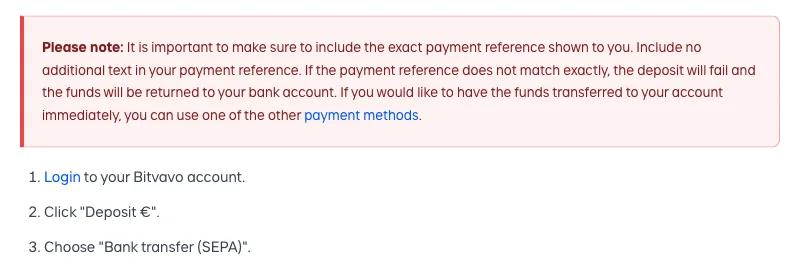
A SEPA deposit needs a payment reference, and Bitvavo wants it exactly as shown. Choose 'Deposit €', then 'Bank transfer (SEPA)', and the exchange displays the account name, the bank account number and your reference. The note above spells out the rule: add no extra text, or the deposit fails.
Bitvavo says a failed deposit goes back to your bank within 5 working days, and so does a transfer with no reference at all, whatever the amount. In practice, a typo leaves your money in transit for up to that long. A correct transfer arrives after 1 working day from a Dutch bank and 2 from an international one, according to the SEPA article.
The reference is static and unique to your account, ten characters of capitals and numbers. Bitvavo also lets you scan the QR code with your bank app.
A standing order raises the stakes. The article on recurring transfers lists what to enter at your own bank: amount, frequency, recipient name, IBAN and the same reference. Transfers without the correct reference are not credited. If your bank blocks identical same-day transfers as duplicates, a change of a few cents in the amount is Bitvavo's suggested workaround.
Recurring Buy, Bitvavo's scheduled purchase, draws on your euro balance and makes no purchase when funds fall short, so set up the standing order a few days before the first run. Setup and viewing happen in the app, not in Pro Mode. Our review covers the setup.
Deposits must come from a personal bank account in your own name. Business and third-party accounts are refunded automatically. For instant funds Bitvavo points to its other payment methods, and some of those carry fees.
The fix: Use the reference exactly as shown and add nothing. Scan the QR code with your bank app, or compare what you typed with the screen character by character. Send only from your own personal bank account.
After you choose Bank transfer (SEPA) under Deposit €, Bitvavo displays the bank details and your payment reference
Mistake 2: Paying a Percentage Fee to Fund Your Account
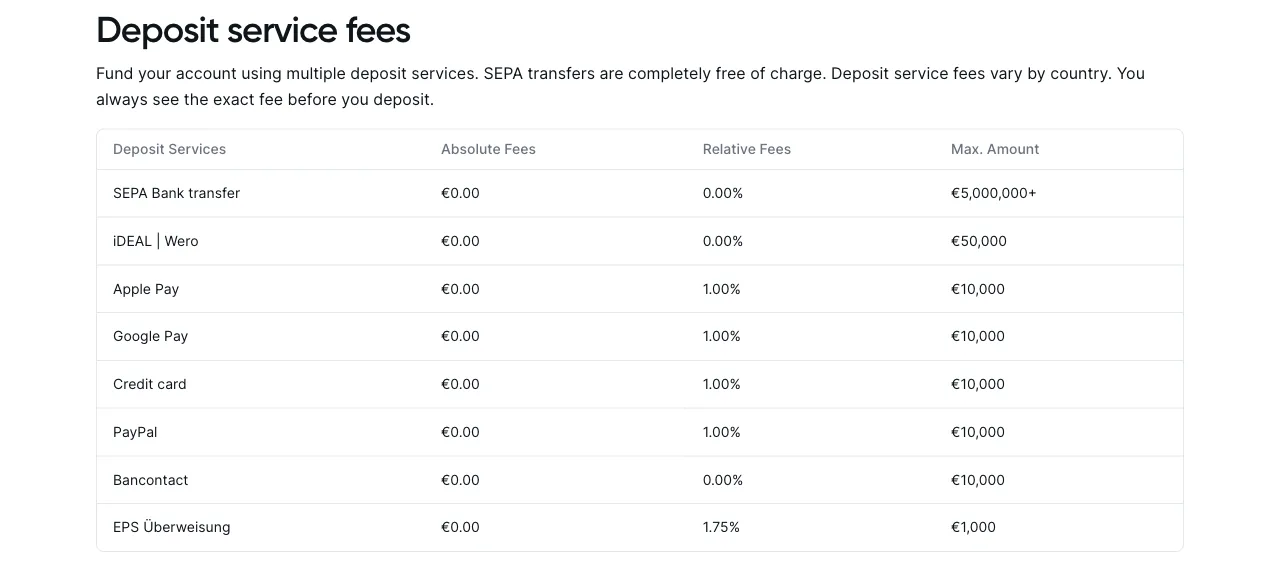
Funding is where the first avoidable cost appears. On 11 October 2026 Bitvavo's fee page listed SEPA transfers, iDEAL | Wero and Bancontact at 0%, while credit cards, Apple Pay, Google Pay and PayPal carried 1%. On a €1,000 deposit that is €10, against nothing by SEPA. For cards, Apple Pay and Google Pay, the help centre adds that the charge cannot be reimbursed.
Our video calls Apple Pay free and puts PayPal at 2%. The fee page now lists both at 1%.
That said, Bitvavo's own Apple Pay article contradicts itself. Its summary says there are no fees for you, yet the FAQ names a 1% deposit service fee and an update in August 2026. EPS sits at 1.75% on the fee page and at 0% in the deposit overview, so trust the amount on screen.
The fee page is also transparent about country differences: deposit fees vary, and the exact amount appears before you confirm. Our Bitvavo review covers the fee table in more detail.
Beyond that, the bigger catch is what a card or PayPal deposit leaves undone. It does not verify a bank account, so withdrawals stay blocked until you fund the account another way. Outside the Netherlands and Germany you may deposit and trade up to €1,000 in total before the IBAN check, yet any withdrawal needs it first. Euros also leave the exchange only by bank transfer, since withdrawals to a credit card or a PayPal account are not possible. According to Bitvavo, a PayPal deposit without a verified IBAN may get your account blocked.
The fix: A workable routine is to make your first deposit by SEPA transfer from your own bank account. That verifies the account, and the fee page lists no charge. Check the fee on the confirmation screen before paying by any other method. The table below works well as a quick check at the deposit screen.
Fee on the fee page | What to check | |
|---|---|---|
| SEPA bank transfer | 0% | The route that verifies your bank account; send the exact payment reference |
| iDEAL | Wero | 0% | The countries page lists it for the Netherlands |
| Bancontact | 0% | Needs a Belgian bank account that a SEPA deposit has verified first |
| Credit card | 1% | Visa and Mastercard work, Maestro does not; the name on the card must match your account |
| Apple Pay | 1% | Apple devices only; the help page summary and its FAQ differ |
| Google Pay | 1% | Named with cards and Apple Pay on the help centre's card page |
| PayPal | 1% | Name and email must match your Bitvavo account; does not verify your bank account |
| EPS | 1.75%, help pages differ | Tied to Austrian bank accounts on its help page; check the fee on screen |
Tip: scroll horizontally to see all columns
Mistake 3: Buying by Market Order and Never Checking Your Order Type
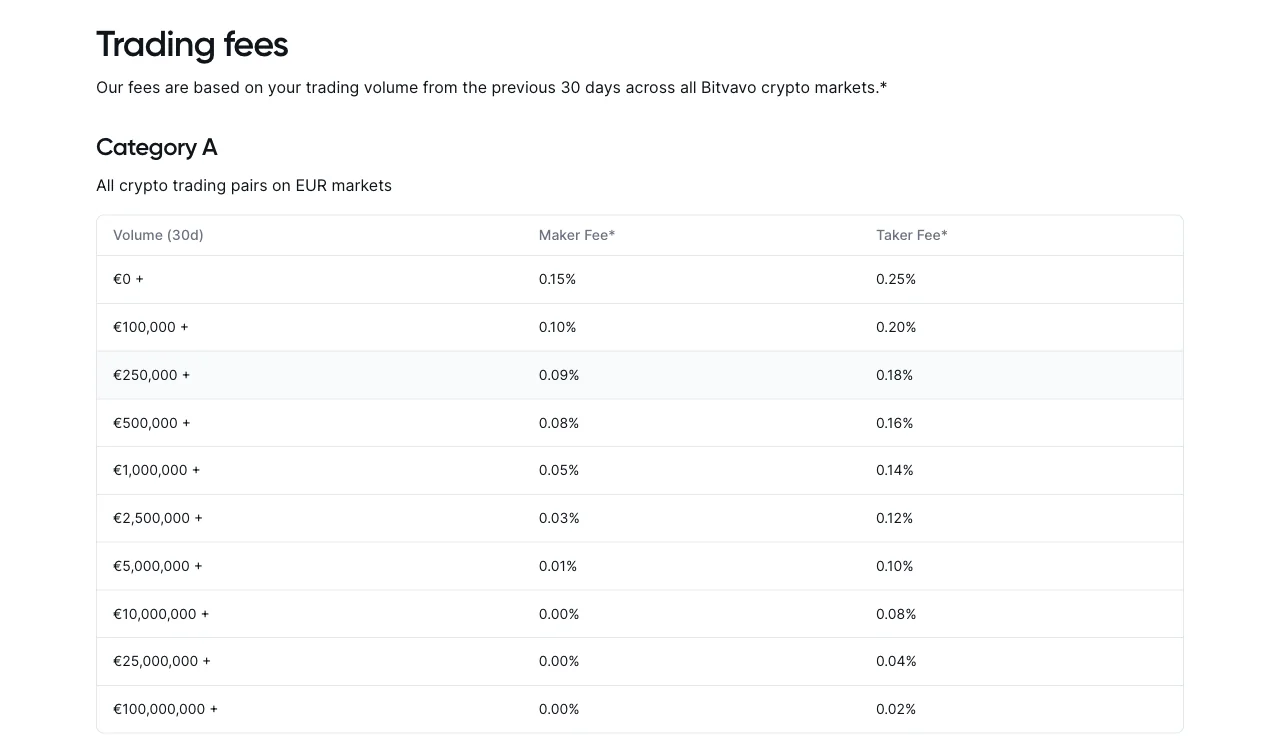
The standard buy flow is short: pick a coin, enter an amount, preview, confirm. The help centre classes this as a market order, and every market order is a taker order. At the base tier of the EUR markets (Category A), the fee page puts takers at 0.25% and makers at 0.15%, calculated from your volume over the previous 30 days.
Makers pay only when their order adds liquidity to the book, such as a limit order that does not fill immediately. A limit order that matches at once is a taker order too, unless you choose post-only, which places the order as a maker order or not at all. If a limit order does not fill at once, Bitvavo reserves the maximum 0.25% and refunds the difference.
Worked example from the published table: on €1,000, base-tier takers pay €2.50 and makers €1.50, a gap of €1. That is arithmetic, not a promise of savings. The gap holds only for the EUR markets. USDC markets start at 0.05% on both sides, so the maker edge does not apply at the base tier there. New customers on the welcome offer will not notice the gap at first, because the offer page lists zero trading fees on the first €10,000 traded in the first seven days.
Our video presents limit orders as a Pro Mode feature. Bitvavo's order-type table lists them for the app, the web, Pro app and Pro web. In the standard app the route is straightforward: tap Buy, then Advanced, then Limit order. The app offers only the Good-Til-Canceled type, an order that stays open until it fills or you cancel it. That is a minor limitation, and the app also cannot update an open order. Stop orders and time-in-force options belong to Pro.
Pro Mode adds an order book, price charts and real-time data at no charge beyond the standard trading fees. To switch it on, tap the profile icon at the top right of the app and use the toggle, or click the Pro Mode entry at the top of the web screen. Some assets can be traded only through price guarantee, so they have no limit orders and no Pro Mode.
A market order runs against the order book, where the spread is the gap between the highest bid and the lowest ask. A price guarantee order currently trades against Inveniam B.V., a Bitvavo group company, at a price that includes a mark-up. Bitvavo's terms say specific fees apply to that service and name no figure, and Bitvavo itself recommends a limit order for anyone who prefers 'to pay 0% spread and trade directly with other users'. Its pricing policy states that there are no hidden costs or spreads beyond those published. Our review explains the mark-up in more detail.
The deciding factor is whether you can wait for your price. The trade-off: a limit order may not fill. Bitvavo cites liquidity, price volatility and time priority, and a self-set price does not bypass its reference price protection.
The fix: Check your default order type under Settings, then Trading, since Bitvavo's pages do not say which one comes preselected, and tap Advanced to choose the type for a single trade. If you can wait for your price, place a limit order via Advanced or Pro Mode.
Mistake 4: Chasing Staking Rates Without Reading the Risk
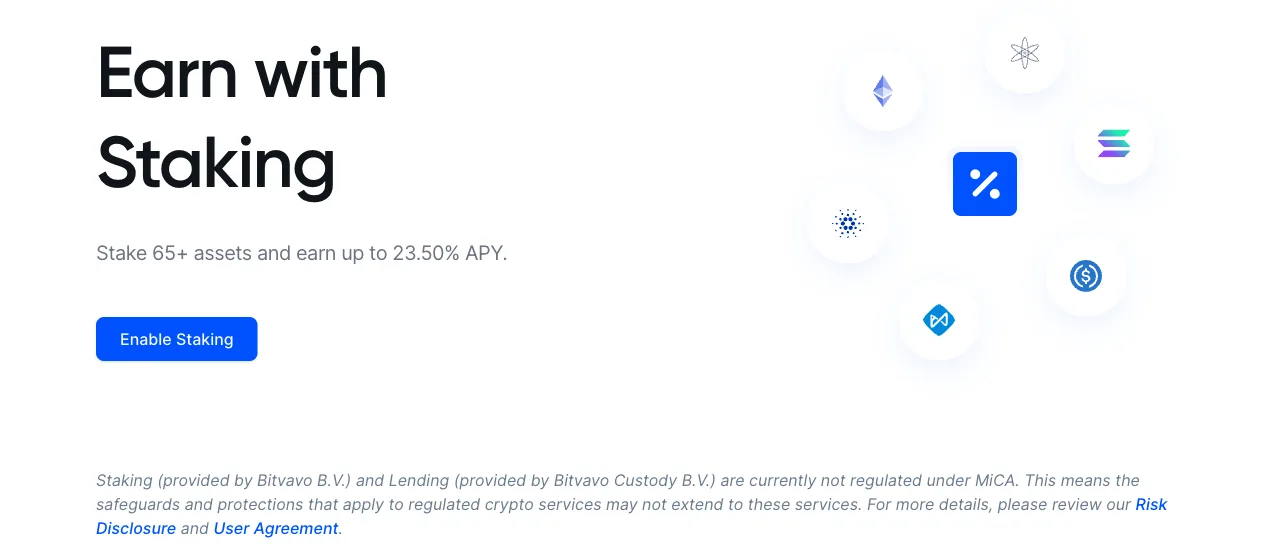
On 11 October 2026 the highest rate on Bitvavo's earn page was 23.50% APY (annual percentage yield) for Livepeer (LPT), against up to 2.00% for Ethereum and up to 3.40% for Solana. Each number sits behind an 'up to'. Our video mentions up to 30%, which no asset on the page reaches. Rates can change.
Flex rewards are usually paid in the asset you hold, and the terms allow rewards in another asset for some coins. Auto Earn calculates them daily and pays them out weekly, every Monday before 23:59 Central European (Summer) Time, and only for assets worth more than €1 in your balance. A price drop can outweigh them: 23.50% earned over a year means little if the coin falls further. Bitvavo's risk disclosure names a related risk: price volatility of the staked asset can mean lower-than-expected rewards, and locking up assets can make them temporarily unavailable. The earn page adds that during a fixed lock-up asset prices may change, affecting the value of your holdings.
Flex staking runs through Auto Earn, which groups flexible staking with lending. According to the help centre each service can be switched on or off individually, and with both switched on, Auto Earn covers every eligible asset in your account at once. The earn page and help centre describe flex assets as tradable and withdrawable at any time. The terms reserve a right in clauses 10.11 and 11.11, though: opt-out and withdrawal periods may be introduced at Bitvavo's discretion when needed to ensure adequate liquidity. Clause 11.3 adds a lending risk. If a borrower defaults and the capital of Bitvavo Custody is exhausted, opted-in users may lose part or all of their lent assets.
Fixed staking is chosen per asset and locks the coins. The help centre gives 30 calendar days and adds that cancelling early costs you the reward. The earn page, however, calls lock-up periods continuously subject to change, and the terms say they may vary by asset. Check the term shown before you opt in.
Bitvavo keeps a commission. In practice, the rate on screen already includes it. Bitvavo's pricing policy calls the displayed APY guaranteed and 'exactly what the User will earn'. The same page says, though, that no rewards are paid when they are lost to a slashing event, a protocol malfunction or a validator failure. Clause 10.10 of the terms calls published rates only estimates that may change. Which wording applies is not clear to us, so treat the rate on screen as today's figure, not as a forecast.
Regulation is a point the earn page flags itself. Staking, provided by Bitvavo B.V., and lending, provided by Bitvavo Custody B.V., are currently not regulated under MiCA, the EU's Markets in Crypto-Assets Regulation, so protections for regulated crypto services may not extend to them. Assets in the Lending Service can leave Bitvavo's custody, as our guide to whether Bitvavo is safe explains.
Bitvavo's risk disclosure defines slashing as a penalty for validator misconduct or protocol violations that can cost you staked assets. What stands out is that Bitvavo's own pages part ways on it. The help centre states 'We cover slashing costs'. Clause 10.5 of the terms says the user may lose all of its digital assets after a slashing event or protocol malfunction, with no duty on Bitvavo to return them. We cannot reconcile the two, so a total loss of the staked assets stays possible.
We recommend no coin.
The fix: Read the risk text on the earn page and in the terms before you switch on flexible staking or lending, and remember that Auto Earn groups the two. Check the lock-up term before opting in to fixed staking.
Mistake 5: Ignoring the Tax Questions That DAC8 Brings
DAC8 is the EU directive that brings crypto-asset service providers into tax reporting. According to the European Commission, providers collect data from 1 January 2026 and report for the first year between 1 January and 30 September 2027. Bitvavo says it reports certain customer information to the Dutch Tax Administration from 2027.
Our video says Bitvavo has sent all transactions to the tax authority since January 2026. The Commission describes a later reporting date and a defined content: identification of the provider and the taxpayer, plus figures per crypto-asset, such as the aggregate gross amount paid or received.
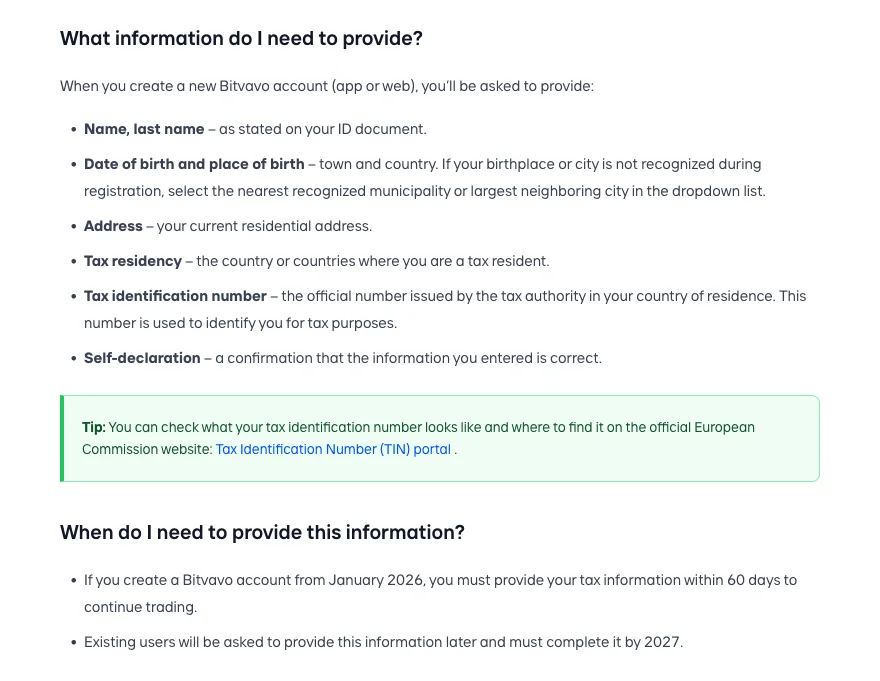
Its tax information page explains what Bitvavo itself asks for: a tax identification number, your countries of tax residency, your place and country of birth and a self-declaration. The screenshot shows the list, plus a tip on the Commission's tax identification number (TIN) portal. One help article gives new accounts from January 2026 60 days to provide these details. Existing users must finish by 2027.
The tax number has a different name in each country, and Bitvavo's help article on its tax questions lists where to find it. The BSN applies in the Netherlands, the IdNr in Germany, the numéro fiscal de référence (SPI) in France, the codice fiscale in Italy, the NIF or NIE in Spain and the Rijksregisternummer in Belgium. The German IdNr is not printed on identity documents and arrives in letters from the Bundeszentralamt für Steuern. Bitvavo may also ask you to confirm your nationality and to provide a personal identification number, which differs from your tax ID. Both are required, and Bitvavo keeps asking until it has them. At present, Bitvavo says, no account limitation applies to those two.
Missing tax details have consequences, described in two help articles that differ. One names a temporary limitation: you can still sell crypto and withdraw euros, while crypto purchases and deposits are paused. The other states that the account may be restricted after a certain period, so you cannot trade but can still withdraw funds.
That said, how gains are taxed depends on where you are tax resident, and Bitvavo gives no tax advice. Its terms put responsibility for taxes on you, so ask a tax professional about your country. For records, Bitvavo's staking help pages say you can export your transaction history and tax statements through CoinTracking, and we cover that tool in our guide to CoinTracking beginner mistakes.
The fix: Have your tax identification number and tax residency details ready at registration. Provide them as soon as Bitvavo asks, and at the latest within the 60 days that one help article names for new accounts. Keep your own transaction records.
Bonus Tip: Know Your Withdrawal Limit Before You Need It
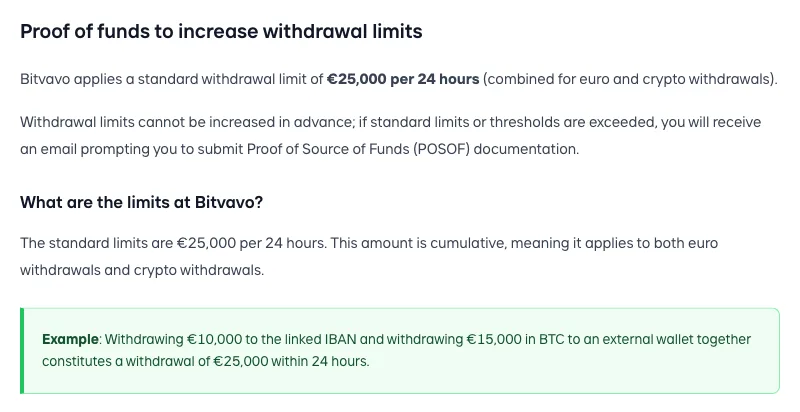
Bitvavo applies a standard withdrawal limit of €25,000 per 24 hours, counted across euro and crypto together. The screenshot shows its example: €10,000 to your IBAN plus €15,000 in Bitcoin to a wallet uses the whole allowance.
Our video says withdrawing more than €25,000 within 24 hours locks the account. Neither the limits page nor Bitvavo's Proof of Source of Funds page describes a lock. The limits page says you need documents to withdraw more than the cap. It adds that this concerns balances of at least €80,000, because below that you can withdraw everything within 4 days. The Proof of Source of Funds page says instead that limits cannot be increased in advance and that Bitvavo emails you once limits or thresholds are exceeded. The one caveat is that the two pages do not line up on sending documents beforehand. The terms are broader. Clause 4.6 lets Bitvavo investigate the source of funds and take measures that include freezing funds or withdrawals, so it pays to have documents ready.
Separately, proof of source of funds can be requested at any time, not only above the limit, and the documents must cover at least your total deposits. For salary or savings the help centre lists payslips not older than six months or a tax return not older than twelve months. Property sales, dividends and other sources have their own lists. Crypto funds call for bank statements or invoices plus a transaction history, and for some sources, such as staking, airdrops or lending, wallet addresses and transaction IDs. Only final versions count, and Bitvavo aims to finish the check within two working days.
Once you submit the requested documents, Bitvavo's compliance team assesses whether you qualify for adjusted limits. Both pages give the same example of someone with €45,000 who withdraws everything in two steps over 25 hours without documents.
The fix: Know the limit before you move a large balance, and keep proof of where the money came from ready: payslips, tax returns or purchase records, and a transaction history for crypto. If Bitvavo emails you for documents, send final versions only.
Standard withdrawal limit: €25,000 per 24 hours, euro and crypto combined
Three Smaller Slips That Delay Your First Withdrawal
The wrong network. Bitvavo warns that sending an asset to a destination on a different network can result in loss of funds. For deposits, the fee page notes that Bitvavo may be able to assist with recovery efforts in some cases, for a €50 administration fee.
A missing setup step. Crypto withdrawals need authenticator-app 2FA and a first bank transfer, and the help centre describes a verification deposit of €1 or €0.01. You then add the address to your address book and confirm it by email. Only wallets and exchanges in your own name are allowed.
A change right before you withdraw. After a password reset, 2FA reset, phone number change or email change, Bitvavo pauses crypto withdrawals for 24 hours. A sensible habit is to plan such changes a day ahead. The 24-hour cooldown that new accounts face after a first deposit is covered in our review.
What Fixing These Mistakes Cannot Change
Fixing these mistakes can save fees and avoid delays. It changes nothing about price risk. Crypto prices can fall sharply, and a total loss of the money you put in is possible.
The same holds for the account itself. The MiCA licence covers Bitvavo's trading platform, custody and transfer services, but not staking, lending, margin trading or the price guarantee service. Under the standard terms, the euro balance carries no deposit guarantee. Our safety guide examines the licence, the custody setup and the liability clauses.
None of this is investment advice or tax advice. Commit only money whose total loss you could absorb.
A Short Checklist Before Your First Deposit
Overall, the five fixes ask for little effort: a careful transfer, a funding choice, a look at the order type, some reading and some paperwork. Bitvavo's pages come across as detailed, but they disagree with each other in places: on deposit fees, on staking terms and on the consequences of missing tax details. Check the amount or the term on screen, and the terms themselves, before you commit.
Run through this list before your first deposit:
- •The payment reference matches the one on screen, character by character.
- •You fund the account by SEPA transfer from your own bank account.
- •You know which order type you are placing.
- •You have read the risk text before switching Auto Earn on.
- •Your tax identification number is ready for Bitvavo's first request.
- •You know the €25,000 limit and keep your documents in one place.
Our Bitvavo review goes deeper on fees and the other catches.
New customers who register through our link can claim a €20 welcome bonus. It is paid after you verify your identity and make a first deposit of at least €20 within seven days of opening the account. The credit follows within 48 hours, and the value has to stay in your account for at least 180 days after it is credited. Only adults who are new customers in the Eurozone qualify, and each account goes through an internal review. Sign-ups through the offer page are possible until 31 December 2026, provided the page stays active, and the terms can change at any time. Readers in Belgium and Spain should check the countries page first, because it points them to bitvavo.be and bitvavo.es.
€20 for adult new Eurozone customers who sign up via our link, after verification and a first deposit of at least €20 within seven days, subject to internal review. A total loss of the money you put in is possible
Frequently asked questions
You might also like
Bitvavo Review 2026: 10 Catches to Know Before You Sign Up
Fees, spread, MiCA scope, the euro balance, withdrawal rules and the sign-up offer, with the catches checked against Bitvavo's own documents.
Is Bitvavo Safe in 2026? Licence, Custody and the Fine Print
The MiCA licence, the foundation structure, liability clauses and the Account Guarantee, read against Bitvavo's own terms.
5 CoinTracking Mistakes Beginners Make (And the Fixes)
Setup and import mistakes that put a crypto tax report at risk, and the built-in reports that help catch gaps before you file.
Legal information
The content on this site has been researched carefully. Our sources are the providers' publicly available information and their terms and conditions. Despite regular checks we cannot warrant that the data is current, accurate or complete. Binding information on products and prices is only available on each provider's own website. Unless stated otherwise, the conditions shown apply to new customers.
Not financial advice
Our content is informational and comparative only. It is not financial, tax or legal advice, and it is neither a recommendation to buy nor an invitation to take out a financial product. Make your decisions based on your own situation and risk tolerance, and consult an independent adviser if you need one.
Risk warning
Every investment carries risk. Values can rise or fall, and past performance does not indicate future returns. You can lose part or all of the capital you invest. Crypto-assets are largely unregulated, are not covered by deposit guarantee or investor compensation schemes, and carry a high risk of total loss.
Advertising and affiliate links
Some links on this site are marked with an asterisk (*) and are affiliate links (advertising). If you take out a product through one of these links, we receive a commission from the provider at no additional cost to you. That is how you support our work.